Improving your app's landing page with your visitors
For software, an app or an online service, the landing page is a real sales page. You invest time and often a budget to bring people to it, and it is where your visitors decide whether to try your product. What turns a good sales page into one that converts steadily is improving it based on what your visitors actually do there.
In short
- Every visitor to your sales page has cost you time or a budget.
- As with your app, a first version online is better than a perfect version that waits.
- A page with no cookie banner and no popup leaves all the room to your product.
- A few numbers are enough to know what keeps your visitors, and what makes them leave.
- You test one version after another, changing only one thing at a time.
A sales page, not just a shop window
To make their app known, most founders launch campaigns, buy advertising, post on social media or write articles. All these sources of traffic share the same destination, your sales page. Every visitor who lands there has cost you time or money, and they decide within seconds whether to go further.
This page has a single goal, that they try your product, sign up or join your waiting list. Everything that helps them understand and decide makes it more effective. I describe what makes a good landing page in can one page be enough, and this article goes further, with what happens once it is online.
Online as soon as possible, then one improvement after another
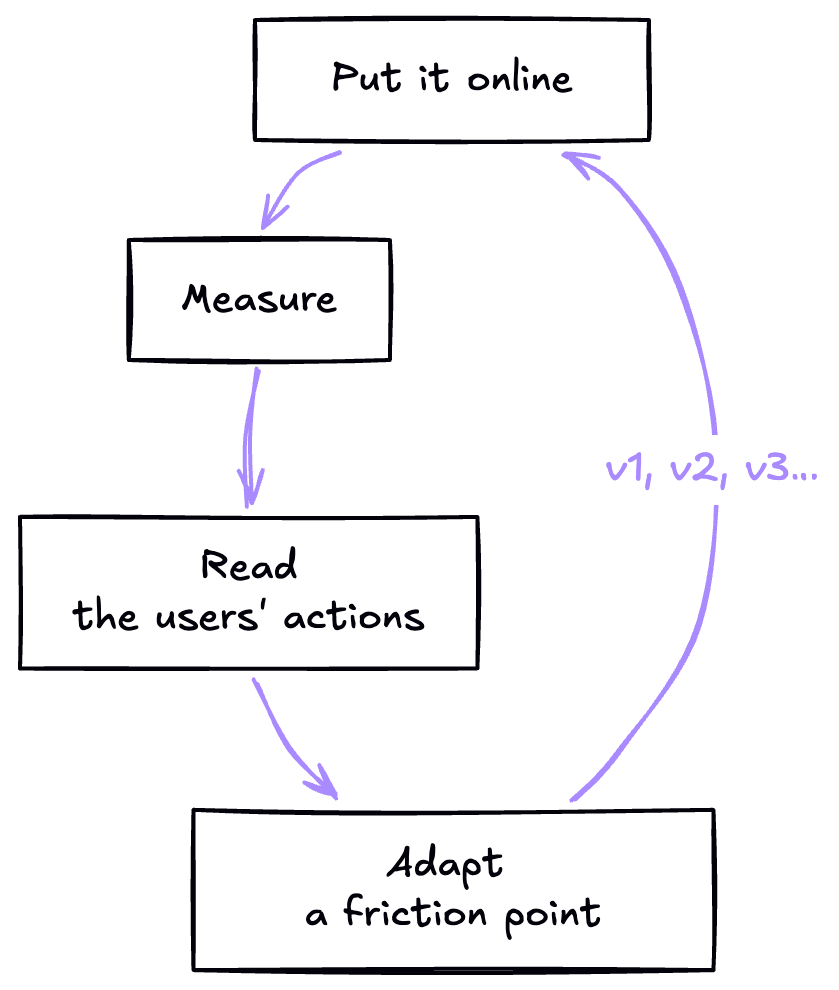
For an app, you often start with a simple first version, an MVP, with the essentials, to put it in front of real users as soon as possible. The same logic applies to a sales page. A clear page online today is better than a perfect page in three months.
Even before the launch, a waiting page on your domain name already does a lot. Google discovers it and starts to know your site, and your first curious visitors can leave their email address to hear about the release.
Then the page improves in small steps, at the pace of the time you can give it and of what your visitors teach you. It is the logic of agile methods such as Scrum, short cycles where you build, measure, learn, then adjust.
A page with nothing between your product and your visitors
On a sales page, every obstacle counts. A cookie banner, a window that opens or a sign-up form that pops up draws attention away at the very moment your visitor discovers your product. They need to see something that catches their eye straight away, understand what your app does and feel its quality.
That is why I recommend cookieless statistics, such as Umami. They count visits anonymously, without storing anything on the visitor's device, and therefore without a banner. I explain how they work in why statistics matter to make your site evolve.
If you run more advanced advertising campaigns, Google Analytics or Google Tag Manager let you track precisely what each ad brings in. They require a cookie banner, which is then kept as unobtrusive as possible.
What to measure
No need for a complicated dashboard. These few numbers already tell almost everything:
Where they come from
A campaign, a social network, Google or an article. You see what brings you the visitors who stay.
How far they read
Every part of the page that is read, from the opening to the prices and the questions.
What they click
Which button, which question, which screenshot holds their attention.
Where they leave
The part of the page your visitor was on when they left.
How many take action
The share of visitors who try, sign up or download. It is the number that matters most.
On which device
Phone or computer, to polish first the version your visitors use most.
Reading the numbers
Numbers become useful once you turn them into an idea to try. Here are a few common situations, and what they suggest:
| What you see | What you can try | |
|---|---|---|
| The opening | Many visitors leave without scrolling past the top of the page. | Say more clearly what your app does, with a picture of the product on the first screen. |
| The button | The page is read to the end, but the button is rarely clicked. | Make it more visible, repeat it higher up, or change its words. |
| The prices | Many visitors leave when they reach the prices. | Remind them of what your product brings just before, or offer a free trial. |
| The phone | Visitors on a phone leave much faster than the others. | Shorten the texts, enlarge the buttons, lighten the images. |
| A campaign | A campaign brings many people, who leave straight away. | Match the page to the promise of the ad, so the visitor finds what they were told about. |
Asking your visitors
The numbers show what your visitors do. To understand why, the simplest way is still to ask them. A few words from a real visitor often shed light on an idea the numbers only hinted at.
A button to give feedback
A small button, always in the same place, that the visitor opens whenever they wish. In Stiip, the app I am developing, a "Feedback" button lets users send a remark at any time.
A one-click rating
A short question at the bottom of the page, such as "Was this page helpful?", with two or three faces to choose from. It is part of the page and never opens on top of it.
A question after sign-up
On the thank-you page or in the welcome email, ask "What made you decide?". The person who has just signed up knows better than anyone what convinced them.
A conversation with your first users
A fifteen-minute call often teaches more than a month of numbers. Your first users are generally happy to help the product they were among the first to discover.
To go further, tools such as Microsoft Clarity or Hotjar record the visitors' journeys and show on maps where they click and how far they scroll. Like Google Analytics, they require a cookie banner, and are better suited to a page that already attracts a lot of people.
Testing one version after another
To know whether a change works, you compare two versions of the page, which is called an A/B test. Large platforms show both versions at the same time, each to half of the visitors, which requires dedicated tools and a lot of traffic.
For a product that is just starting, there is a simpler way. You put version A online for a week, then version B the following week, and you compare the share of visitors who took action. For the comparison to be fair, the two weeks must be alike, with no new campaign in between and no holiday period.
One change at a time, or you will never know which one worked.
The title, the button, the image on the first screen, the order of the sections, each can be tested. Start with what the numbers point to, and keep the version that works best as the basis for the next test.
What I measure on my own site
On eyn.art, I have set up this tracking, without cookies and without a banner. I see every part of a page that is read, every button clicked with the words written on it, and the part the visitor was on when they left. Nothing personal is sent, no name, no address, no message.
These numbers have already led me to completely rethink my contact form, my portfolio and my navigation, which will keep evolving. One day, I saw a visitor stumble several times on the same field, at the same step of the old form. That is how I discovered a problem that only appeared on Safari, and I was able to fix it. Every version teaches me something for the next one.
It is this same tracking that I set up for my clients, and that then lets us decide together on the next improvement, with the numbers to back it up.
A sales page for your app
€950 excl. VAT
This is the starting price of a sales page designed and developed for your product at EYN Studio:
- A waiting page can be online within a week, and the full page within two to four weeks.
- Cookieless statistics as an option, set up with their dashboard for €150 excl. VAT.
- Google Analytics as an option, with a GDPR-compliant cookie banner, for €250 excl. VAT.
- Improvements as the numbers come in, at €75 excl. VAT an hour, billed by the quarter hour.
Your questions
Do you need a cookie banner to measure your sales page?
No, not with anonymous statistics such as Umami or Matomo, which store nothing on the visitor's device. The banner becomes necessary with tools such as Google Analytics or some advertising.
How many visitors does an A/B test need?
The more there are, the more reliable the result. With few visits, test clearly visible changes, such as the title or the image on the first screen, rather than details.
How often should the page evolve?
One version a week or every two weeks, depending on your traffic. What matters is giving each version enough time to receive enough visitors to judge it.
Is a waiting page enough to start with?
Yes. It makes your domain name known to search engines, presents your project and collects the addresses of your first interested visitors, while the full page is on its way.
Umami or Google Analytics?
Umami for a page with no banner, fast and respectful of your visitors, which is enough for most products that are just starting. Google Analytics when you invest in advertising campaigns and want to follow each ad in detail.
Want a sales page that grows with your app? Everything is explained on the web design page.
Thanks for reading


Written by

Lexy Callemeyn
Graphic designer & web developer
Hello! I'm Lexy, a graphic designer and a developer of websites and apps for 12 years. Every project is unique to me: I draw logos and I build custom websites for freelancers and companies, from the first sketch to going live, to help them reach their goals with a strong identity online.
A question, a project in mind? Write to me, or discover my work through the links below.
And now?
Want to go further?
Let's talk about your website
Read next