Headless WordPress, the architecture explained
A headless WordPress keeps only its admin, the secure interface where your teams manage the content, and hands the public site over to a tool developed separately, designed for the speed and the design your project needs. In this article, I explain why you would make this choice, how the architecture works, what needs preparing in WordPress and what it involves.
What headless means
A classic WordPress manages your content and also displays it, through its theme and in the PHP language. In headless mode, only the admin is kept, the secure interface where content is written and organised, and the public site is developed separately with a framework that fetches this content through the WordPress API.
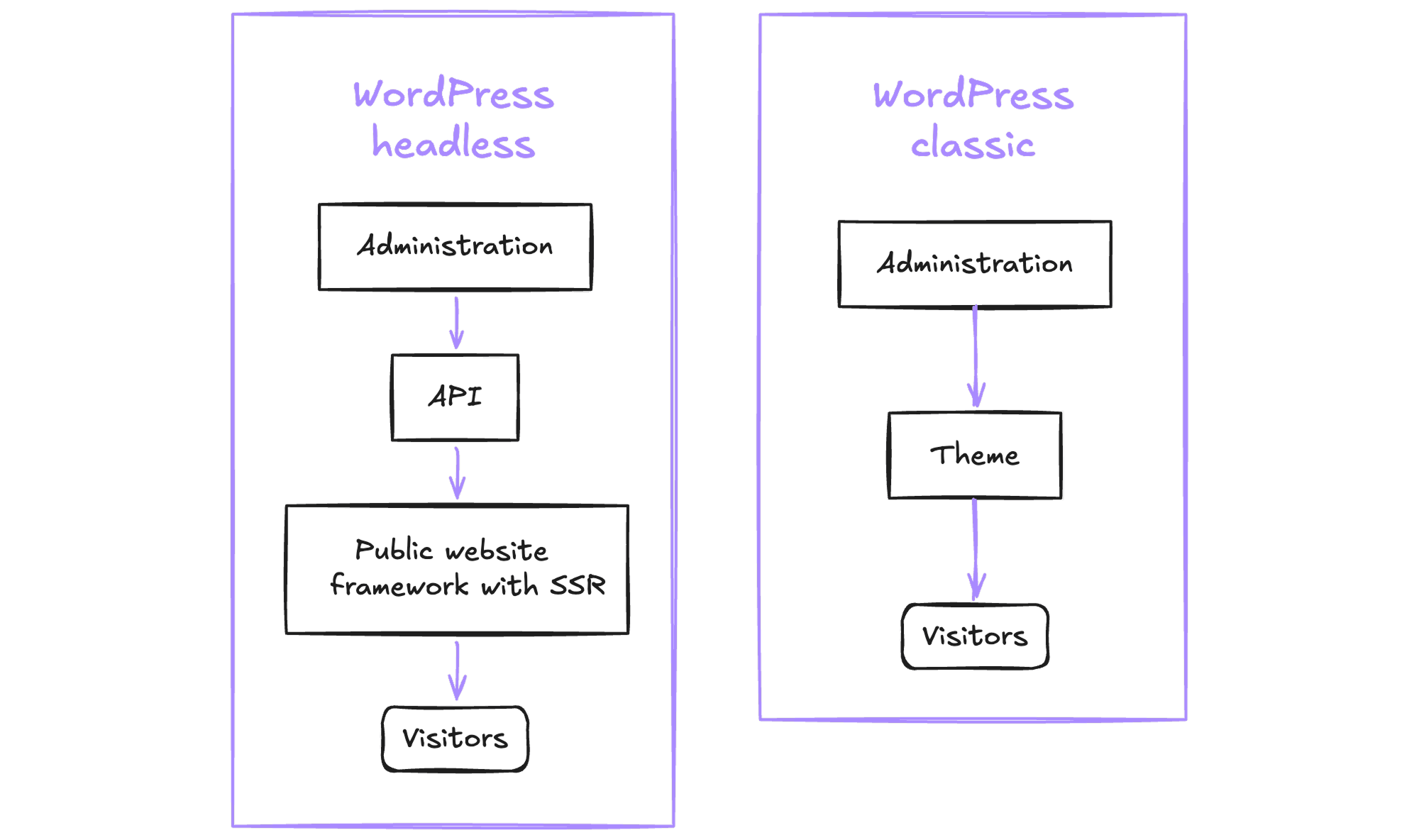
Editors keep working exactly as before, while visitors discover a fast site without ever going through WordPress.
Why WordPress, and when to choose headless
WordPress powers more than 40% of websites, and that is precisely what makes it a very good foundation for a headless architecture. A great many developers, webmasters and content managers already know it, which makes it immediately familiar to teams, and recruitment much simpler as a result.
With Advanced Custom Fields (ACF), WordPress also makes it possible to build a tailor-made editing experience. When you design both the interface and the product, you know who will write in the admin and what these people need day to day, you prepare exactly the fields they need, and you adjust them as their feedback comes in, in the same way you adjust the details of a public site according to how visitors behave.
Headless really comes into its own for a large site, with an editorial team used to WordPress, high performance or security requirements, a custom design, or content that also feeds an application. For a small showcase site, it is often more than is needed, and a custom website with a simple management interface does the job very well for a much smaller budget.
The architecture
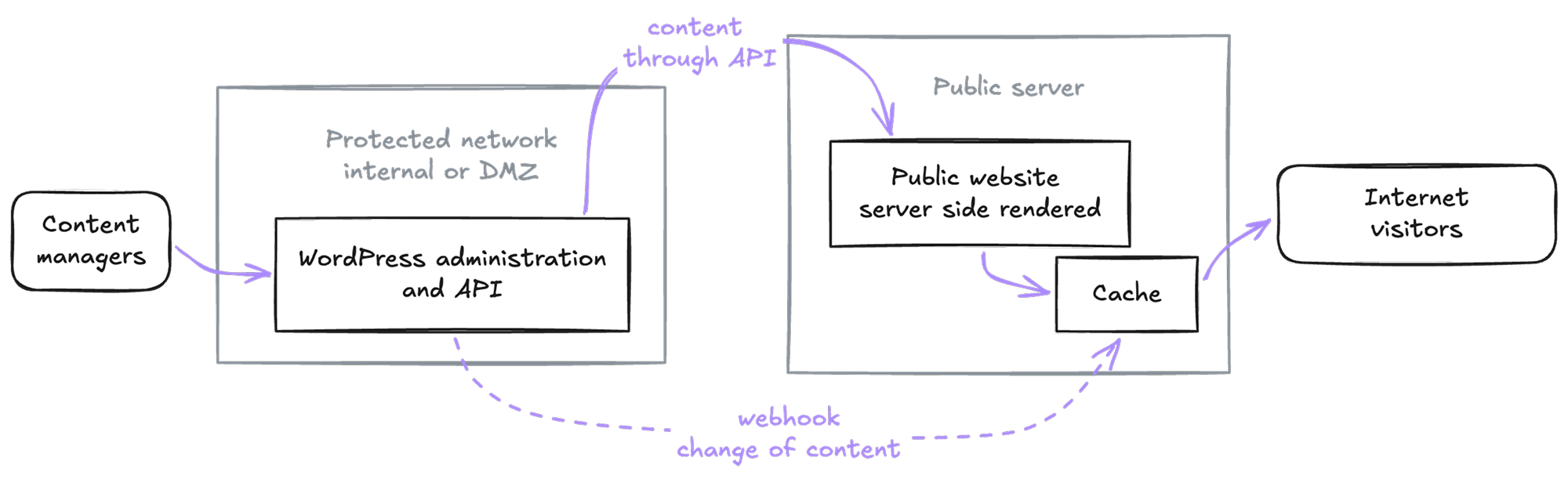
This is the architecture I put in place for a large organisation, with a public site in Angular rendered on the server. Angular is only one choice among others, since Next.js, Nuxt, SvelteKit or Astro do the same job, as long as the framework can generate pages on the server.
A piece of content travels from the editors to the visitor in five steps:
- Editors write in the WordPress admin, with their fields, their categories and their SEO settings, just as they are used to.
- WordPress exposes this content through its REST API, or in GraphQL with the WPGraphQL plugin.
- The public site fetches the content and generates complete HTML pages on the server (SSR), so Google, link previews and visitors immediately receive a full page.
- A cache keeps these pages, and, as soon as a piece of content changes, WordPress notifies the server through a webhook that calls a Node.js service to delete and regenerate the page concerned.
- The visitor receives a fast page, served without ever calling on WordPress.
What needs preparing in WordPress
This is the part most often underestimated, because everything the theme did on its own now has to go through the API, and WordPress has to be configured to expose it properly:
- The REST API has been active by default since WordPress 4.7, but it has to be opened to your own content, with
show_in_reston every custom post type and every taxonomy, while deciding what stays private. - ACF fields do not appear in the API on their own. Since ACF 5.11, each field group can be exposed with the "Show in REST API" option, and its data then arrives under the
acfkey. - SEO plugs into the plugin the editors already use. Yoast SEO returns each page's tags in the API (
yoast_head_json) and Rank Math offers a "Headless CMS Support" mode, which lets the site pick up the titles, descriptions and structured data entered in WordPress. - The sitemap is a special case. The one WordPress generates reflects the structure of its own pages, not that of the public site built with the framework, whose addresses and organisation may differ, so it has to be generated on the server by the site itself.
- Menus do have their routes in the API, but they require authentication, and a small custom endpoint makes them readable by the site.
- Previewing drafts is the trickiest point, but it can be solved. The "Preview" button still points to the theme, and a custom PHP function has to redirect it to the site, with a token that allows it to read unpublished content.
- The cache has to be told about every change, thanks to a hook on content saving that calls the site.
- The old front end is no longer used, and its pages have to be redirected or closed so that Google does not find the same content twice.
- The admin can live on a different server from the public site, in a protected network such as your internal network or a DMZ. Because the site fetches the content on the server, only the public site is exposed to the internet, and WordPress never needs to be publicly accessible.
It amounts to a little PHP, nothing huge, with a few endpoints, a few filters and two or three hooks, but it is work to plan from the very start of the project.
What you gain, and what it takes
| What you gain | What it takes | |
|---|---|---|
| Editing | The WordPress admin the team already knows, with a content model designed for them, in ACF fields or Gutenberg blocks. | Content structured in fields, with no page builder such as Elementor, and no WYSIWYG editor that matches the site. |
| Design | A decoupled front end and complete freedom, with the framework and the design system of your choice. | The whole front end has to be developed, including what the theme and the shortcodes used to render on their own. |
| Performance | Pages rendered on the server (SSR), cached or served by a CDN, for a very short TTFB and good Core Web Vitals. | A Node.js server to host, hydration to keep an eye on and cache invalidation to orchestrate, page by page. |
| Security | A reduced attack surface, with a WordPress the public no longer sees, neither wp-login.php nor xmlrpc.php. | Two systems to update instead of one, and an API whose private routes have to be authenticated. |
| SEO | Complete HTML from the very first response, and the Yoast or Rank Math settings carried over as they are, structured data included. | Meta, canonical and hreflang tags to wire up, and an XML sitemap generated by the site. |
| Preview | Drafts and revisions visible on the real site before they are published. | A redirect, a secure token (nonce or JWT) and a route that bypasses the cache. |
| Plugins | Admin plugins, for roles, approval workflows or fields, keep working. | Those that displayed something on the public site, forms, carousels or shortcodes, have to be rebuilt in the framework. |
| Infrastructure | Each part evolves and scales separately, and the public site, being stateless, is replicated behind a load balancer to absorb a traffic peak without calling on WordPress. | Two deployments, each with its own CI/CD pipeline and monitoring, and a cache shared between the instances, or purges that reach all of them. |
| The future | An API-first architecture, with a site that can be rebuilt without migrating the content, and content that can feed an application, written once and published everywhere (COPE). | A team that knows both worlds, WordPress and the framework, and an API contract to respect on both sides. |
Your questions
What is a headless CMS?
It is a CMS of which only the admin is kept, the interface where content is managed. The content goes out through an API, and a site developed separately lays it out.
Is headless WordPress good for SEO?
Yes, provided the site is rendered on the server. With Yoast SEO or Rank Math, the titles, descriptions and structured data entered in WordPress are picked up by the site, which also generates its own sitemap.
REST API or GraphQL?
The REST API is built into WordPress and is often enough. WPGraphQL, a plugin, lets you request exactly the fields you want in a single query, which becomes useful when pages bring together a lot of different content.
Can you keep draft previews?
Yes, even though it is the trickiest point. A custom PHP function redirects the "Preview" button to the site, which reads the draft thanks to a token.
Does it take a lot of PHP?
No, a few endpoints, a few filters and two or three hooks are usually enough, but they are part of the project from the start.
How much does a headless WordPress cost?
Every project has its own budget, depending on the amount of content, the design and the integrations, but a headless architecture generally represents several months of development, between preparing WordPress, the public site and its infrastructure. It is a significant budget, in line with large-scale projects.
Building a product and looking for someone to design its architecture? You can discover my background on LinkedIn, or write to me directly at lexy@eyn.art. And when your product is ready to meet its audience, I can also draw its logo and its visual identity.
Thanks for reading


Written by

Lexy Callemeyn
Graphic designer & web developer
Hello! I'm Lexy, a graphic designer and a developer of websites and apps for 12 years. Every project is unique to me: I draw logos and I build custom websites for freelancers and companies, from the first sketch to going live, to help them reach their goals with a strong identity online.
A question, a project in mind? Write to me, or discover my work through the links below.
And now?
Want to go further?
Let's talk about your website
Read next